About Retirement Estimator
Retirement Estimator is your personal pocket financial assistant for simulating and visualizing financial scenarios days to decades into the future. EXPLORE YOUR RETIREMENT POSSIBILITIES Model any combination of income...
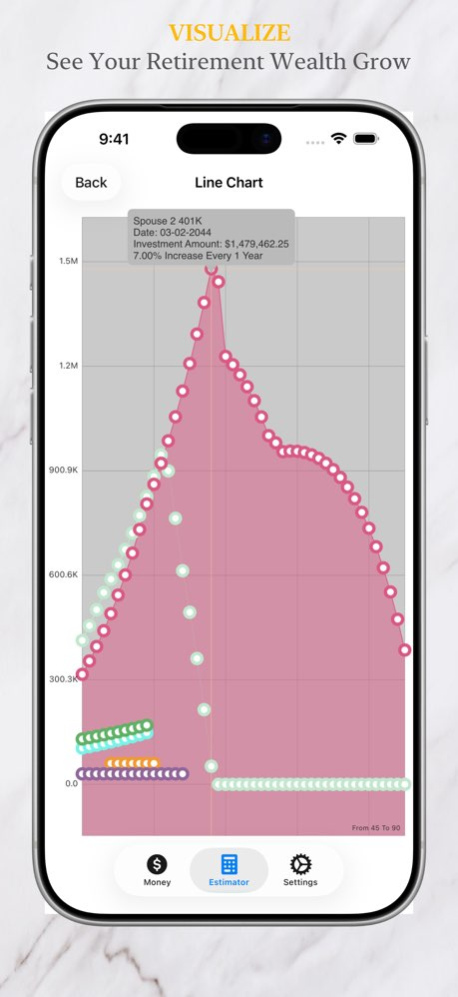
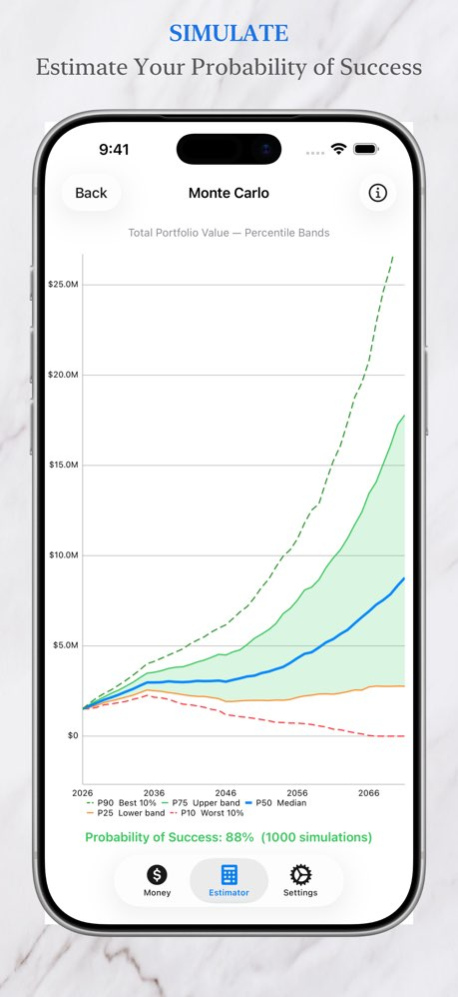
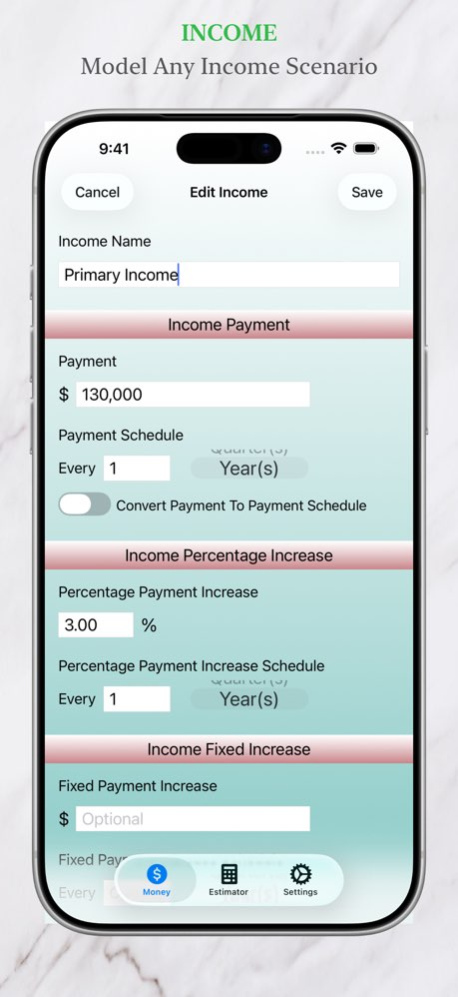
Retirement Estimator is your personal pocket financial assistant for simulating and visualizing financial scenarios days to decades into the future. EXPLORE YOUR RETIREMENT POSSIBILITIES Model any combination of income streams, investments, and expenses with full control over monetary value, taxes, anticipated growth rate, and time horizon. Simulate transfers between income, investments, and expenses to explore "what if" scenarios. Run Monte Carlo simulations to model a range of possible financial outcomes and estimate the probability that your retirement plan succeeds. Then experiment by adjusting income sources, investments, and expenses to see how each decision shapes your projected results. VISUALIZE YOUR FINANCIAL FUTURE . Track income, investments, and expenses with clear, color-coded line graphs . Estimate your Probability of Success with Monte Carlo simulation . Export detailed CSV reports to Excel, Numbers, or any spreadsheet app . Simulate fund transfers between income, investments, and expenses . Model scenarios from days to decades into the future PRIVACY FIRST. ALL DATA STAYS ON YOUR DEVICE Everything you enter is stored locally on your device and is never transmitted to ITDT LLC or any third party. No account required. SECURE ACCESS Protect your financial data with Face ID, Touch ID, or a PIN.
Version History • Fixed potential crash on startup caused by app starting while the device is locked. • The Shortcuts actions run while your device is unlocked. 1.7.2 1d ago • Monte Carlo Simulation improvements. Each account's investment returns and each expense's inflation vary by the amounts set in Monte Carlo Settings, whether the account compounds monthly, quarterly, or yearly. • UI improvements. 1.7.1 Sep 26 • Import plan files. Open a Retirement Estimator plan file (.financialplan) from Files, Mail, Messages, or AirDrop, or double-click it on a Mac, then choose Replace, Merge, or Compare. • Every plan file is checked in full before anything is imported. If something needs fixing, each problem is listed and nothing is changed. • New Shortcuts actions: Import Plan and Plan Summary. • UI and data import improvements. 1.7.0 Sep 26 • Compare two estimator configurations on one line graph. Open an estimator configuration, press "Compare Graphs," and choose a second one to draw alongside it with dashed lines. • See two plans side by side. Compare retiring at 62 against retiring at 67, or any two scenarios you have set up. • Compare your plan against an earlier version of it. Import a data file you exported previously with the new Compare option, then graph it against your current plan. • Tap any point on a compared graph to see its details along with the name of the estimator configuration it belongs to. 1.6.0 Sep 5 • New transfer setup guidance. When you create more than one transfer from the same source, the app now offers tips and one-tap suggestions to help you set their schedules. • Apply suggestions together. Review the suggested schedule settings across your transfers, apply them in one step — changing only what's needed. • Apply Auto-Fix All to resolve all transfer schedule conflicts in one step. • More on-screen tips as you enter income, investment, and expense details. 1.5.0 Jun 7 • Faster Monte Carlo Simulation. Simulations now run faster, and transfer calculations have been further optimized so large, complex scenarios complete more quickly. • Improved UI Rendering. • Updated Privacy Policy. The in-app privacy statement has been expanded to include third-party service disclosures and user rights information (GDPR/CCPA). 1.4.1 May 3 • Monte Carlo Simulation. Run thousands of simulations of your retirement plan to see a range of possible financial outcomes and estimate your Probability of Success. Results are displayed as a percentile chart showing best-case, worst-case, and median portfolio trajectories from P10 to P90 over time. Tap anywhere on the chart for a detailed breakdown at that date. • Monte Carlo Settings. Configure the number of simulations and the volatility parameters for investment returns, income growth, and expense inflation to match your personal risk assumptions. Access Monte Carlo Settings from the Settings tab. • Experiment with your plan. Use the Enabled toggle in CSV Report/Graphing Options to quickly turn income sources, investments, and expenses on and off and immediately see how each change affects your Probability of Success. 1.4.0 Apr 27 • Improved in-app purchase reliability — upgraded to Apple's latest StoreKit 2 framework for faster, more dependable purchases and restores. • iPad fix — resolved a navigation issue affecting the tab bar on iPadOS 18 and later. • General stability improvements and bug fixes. 1.3.3 Apr 21 Reduced displayed graph values from many decimal digits to two decimal digits. Minor updates for iOS 17. 1.3.2 09/12/2024 Fixed display of Estimator graph markers. The release of iOS 17 caused graph point markers not to display properly. Updates for iOS 17. 1.3.1 12/26/2023 Added the option to align CSV report columns by date. Aligning the CSV report columns by date makes it easier to view the combined income, investment, expense, and transfer activity in chronological order. 1.3.0 10/07/2022 Updates for iOS 13. 1.2.4 05/08/2020 Automatically convert Income from any payment periodic schedule to any other payment periodic schedule. Automatically convert Expense from any cost periodic schedule to any other cost periodic schedule. 1.2.1 03/07/2020 Update help page. 1.1.2 01/26/2020 List transfers by priority rather than alphabetically. Update menu for data import. 1.1.1 01/12/2020 Import and merge multiple financial data sets. Highlight finances of particular interest with graphing fill colors. 1.1.0 03/15/2019 Added help to resolve transfer conflicts. 1.0.5 03/08/2019 1.0.4 02/28/2019
Previous Versions
Here you can find the changelog of Retirement Estimator since it was posted on our website on 2023-09-25 15:25:20.
The latest version is 1.7.2 and it was updated on 2026-10-07 10:59:57. See below the changes in each version.
Retirement Estimator version 1.7.2
Updated At: 2026-10-07
Changes: Version History • Fixed potential crash on startup caused by app starting while the device is locked.
• The Shortcuts actions run while your device is unlocked. 1.7.2 1d ago • Monte Carlo Simulation improvements. Each account's investment returns and each expense's inflation vary by the amounts set in Monte Carlo Settings, whether the account compounds monthly, quarterly, or yearly.
• UI improvements. 1.7.1 Sep 26 • Import plan files. Open a Retirement Estimator plan file (.financialplan) from Files, Mail, Messages, or AirDrop, or double-click it on a Mac, then choose Replace, Merge, or Compare.
• Every plan file is checked in full before anything is imported. If something needs fixing, each problem is listed and nothing is changed.
• New Shortcuts actions: Import Plan and Plan Summary.
• UI and data import improvements. 1.7.0 Sep 26 • Compare two estimator configurations on one line graph. Open an estimator configuration, press "Compare Graphs," and choose a second one to draw alongside it with dashed lines.
• See two plans side by side. Compare retiring at 62 against retiring at 67, or any two scenarios you have set up.
• Compare your plan against an earlier version of it. Import a data file you exported previously with the new Compare option, then graph it against your current plan.
• Tap any point on a compared graph to see its details along with the name of the estimator configuration it belongs to. 1.6.0 Sep 5 • New transfer setup guidance. When you create more than one transfer from the same source, the app now offers tips and one-tap suggestions to help you set their schedules.
• Apply suggestions together. Review the suggested schedule settings across your transfers, apply them in one step — changing only what's needed.
• Apply Auto-Fix All to resolve all transfer schedule conflicts in one step.
• More on-screen tips as you enter income, investment, and expense details. 1.5.0 Jun 7 • Faster Monte Carlo Simulation. Simulations now run faster, and transfer calculations have been further optimized so large, complex scenarios complete more quickly.
• Improved UI Rendering.
• Updated Privacy Policy. The in-app privacy statement has been expanded to include third-party service disclosures and user rights information (GDPR/CCPA). 1.4.1 May 3 • Monte Carlo Simulation. Run thousands of simulations of your retirement plan to see a range of possible financial outcomes and estimate your Probability of Success. Results are displayed as a percentile chart showing best-case, worst-case, and median portfolio trajectories from P10 to P90 over time. Tap anywhere on the chart for a detailed breakdown at that date.
• Monte Carlo Settings. Configure the number of simulations and the volatility parameters for investment returns, income growth, and expense inflation to match your personal risk assumptions. Access Monte Carlo Settings from the Settings tab.
• Experiment with your plan. Use the Enabled toggle in CSV Report/Graphing Options to quickly turn income sources, investments, and expenses on and off and immediately see how each change affects your Probability of Success. 1.4.0 Apr 27 • Improved in-app purchase reliability — upgraded to Apple's latest StoreKit 2 framework for faster, more dependable purchases and restores.
• iPad fix — resolved a navigation issue affecting the tab bar on iPadOS 18 and later.
• General stability improvements and bug fixes. 1.3.3 Apr 21 Reduced displayed graph values from many decimal digits to two decimal digits.
Minor updates for iOS 17. 1.3.2 09/12/2024 Fixed display of Estimator graph markers. The release of iOS 17 caused graph point markers not to display properly.
Updates for iOS 17. 1.3.1 12/26/2023 Added the option to align CSV report columns by date. Aligning the CSV report columns by date makes it easier to view the combined income, investment, expense, and transfer activity in chronological order. 1.3.0 10/07/2022 Updates for iOS 13. 1.2.4 05/08/2020 Automatically convert Income from any payment periodic schedule to any other payment periodic schedule.
Automatically convert Expense from any cost periodic schedule to any other cost periodic schedule. 1.2.1 03/07/2020 Update help page. 1.1.2 01/26/2020 List transfers by priority rather than alphabetically.
Update menu for data import. 1.1.1 01/12/2020 Import and merge multiple financial data sets.
Highlight finances of particular interest with graphing fill colors. 1.1.0 03/15/2019 Added help to resolve transfer conflicts. 1.0.5 03/08/2019 1.0.4 02/28/2019
Retirement Estimator version 1.7.1
Updated At: 2026-10-03
Changes: Version History • Monte Carlo Simulation improvements. Each account's investment returns and each expense's inflation vary by the amounts set in Monte Carlo Settings, whether the account compounds monthly, quarterly, or yearly.
• UI improvements. 1.7.1 6d ago • Import plan files. Open a Retirement Estimator plan file (.financialplan) from Files, Mail, Messages, or AirDrop, or double-click it on a Mac, then choose Replace, Merge, or Compare.
• Every plan file is checked in full before anything is imported. If something needs fixing, each problem is listed and nothing is changed.
• New Shortcuts actions: Import Plan and Plan Summary.
• UI and data import improvements. 1.7.0 Sep 26 • Compare two estimator configurations on one line graph. Open an estimator configuration, press "Compare Graphs," and choose a second one to draw alongside it with dashed lines.
• See two plans side by side. Compare retiring at 62 against retiring at 67, or any two scenarios you have set up.
• Compare your plan against an earlier version of it. Import a data file you exported previously with the new Compare option, then graph it against your current plan.
• Tap any point on a compared graph to see its details along with the name of the estimator configuration it belongs to. 1.6.0 Sep 5 • New transfer setup guidance. When you create more than one transfer from the same source, the app now offers tips and one-tap suggestions to help you set their schedules.
• Apply suggestions together. Review the suggested schedule settings across your transfers, apply them in one step — changing only what's needed.
• Apply Auto-Fix All to resolve all transfer schedule conflicts in one step.
• More on-screen tips as you enter income, investment, and expense details. 1.5.0 Jun 7 • Faster Monte Carlo Simulation. Simulations now run faster, and transfer calculations have been further optimized so large, complex scenarios complete more quickly.
• Improved UI Rendering.
• Updated Privacy Policy. The in-app privacy statement has been expanded to include third-party service disclosures and user rights information (GDPR/CCPA). 1.4.1 May 3 • Monte Carlo Simulation. Run thousands of simulations of your retirement plan to see a range of possible financial outcomes and estimate your Probability of Success. Results are displayed as a percentile chart showing best-case, worst-case, and median portfolio trajectories from P10 to P90 over time. Tap anywhere on the chart for a detailed breakdown at that date.
• Monte Carlo Settings. Configure the number of simulations and the volatility parameters for investment returns, income growth, and expense inflation to match your personal risk assumptions. Access Monte Carlo Settings from the Settings tab.
• Experiment with your plan. Use the Enabled toggle in CSV Report/Graphing Options to quickly turn income sources, investments, and expenses on and off and immediately see how each change affects your Probability of Success. 1.4.0 Apr 27 • Improved in-app purchase reliability — upgraded to Apple's latest StoreKit 2 framework for faster, more dependable purchases and restores.
• iPad fix — resolved a navigation issue affecting the tab bar on iPadOS 18 and later.
• General stability improvements and bug fixes. 1.3.3 Apr 21 Reduced displayed graph values from many decimal digits to two decimal digits.
Minor updates for iOS 17. 1.3.2 09/12/2024 Fixed display of Estimator graph markers. The release of iOS 17 caused graph point markers not to display properly.
Updates for iOS 17. 1.3.1 12/26/2023 Added the option to align CSV report columns by date. Aligning the CSV report columns by date makes it easier to view the combined income, investment, expense, and transfer activity in chronological order. 1.3.0 10/07/2022 Updates for iOS 13. 1.2.4 05/08/2020 Automatically convert Income from any payment periodic schedule to any other payment periodic schedule.
Automatically convert Expense from any cost periodic schedule to any other cost periodic schedule. 1.2.1 03/07/2020 Update help page. 1.1.2 01/26/2020 List transfers by priority rather than alphabetically.
Update menu for data import. 1.1.1 01/12/2020 Import and merge multiple financial data sets.
Highlight finances of particular interest with graphing fill colors. 1.1.0 03/15/2019 Added help to resolve transfer conflicts. 1.0.5 03/08/2019 1.0.4 02/28/2019
Retirement Estimator version 1.6.0
Updated At: 2026-09-25
Changes: Version History • Compare two estimator configurations on one line graph. Open an estimator configuration, press "Compare Graphs," and choose a second one to draw alongside it with dashed lines.
• See two plans side by side. Compare retiring at 62 against retiring at 67, or any two scenarios you have set up.
• Compare your plan against an earlier version of it. Import a data file you exported previously with the new Compare option, then graph it against your current plan.
• Tap any point on a compared graph to see its details along with the name of the estimator configuration it belongs to. 1.6.0 Sep 5 • New transfer setup guidance. When you create more than one transfer from the same source, the app now offers tips and one-tap suggestions to help you set their schedules.
• Apply suggestions together. Review the suggested schedule settings across your transfers, apply them in one step — changing only what's needed.
• Apply Auto-Fix All to resolve all transfer schedule conflicts in one step.
• More on-screen tips as you enter income, investment, and expense details. 1.5.0 Jun 7 • Faster Monte Carlo Simulation. Simulations now run faster, and transfer calculations have been further optimized so large, complex scenarios complete more quickly.
• Improved UI Rendering.
• Updated Privacy Policy. The in-app privacy statement has been expanded to include third-party service disclosures and user rights information (GDPR/CCPA). 1.4.1 May 3 • Monte Carlo Simulation. Run thousands of simulations of your retirement plan to see a range of possible financial outcomes and estimate your Probability of Success. Results are displayed as a percentile chart showing best-case, worst-case, and median portfolio trajectories from P10 to P90 over time. Tap anywhere on the chart for a detailed breakdown at that date.
• Monte Carlo Settings. Configure the number of simulations and the volatility parameters for investment returns, income growth, and expense inflation to match your personal risk assumptions. Access Monte Carlo Settings from the Settings tab.
• Experiment with your plan. Use the Enabled toggle in CSV Report/Graphing Options to quickly turn income sources, investments, and expenses on and off and immediately see how each change affects your Probability of Success. 1.4.0 Apr 27 • Improved in-app purchase reliability — upgraded to Apple's latest StoreKit 2 framework for faster, more dependable purchases and restores.
• iPad fix — resolved a navigation issue affecting the tab bar on iPadOS 18 and later.
• General stability improvements and bug fixes. 1.3.3 Apr 21 Reduced displayed graph values from many decimal digits to two decimal digits.
Minor updates for iOS 17. 1.3.2 09/12/2024 Fixed display of Estimator graph markers. The release of iOS 17 caused graph point markers not to display properly.
Updates for iOS 17. 1.3.1 12/26/2023 Added the option to align CSV report columns by date. Aligning the CSV report columns by date makes it easier to view the combined income, investment, expense, and transfer activity in chronological order. 1.3.0 10/07/2022 Updates for iOS 13. 1.2.4 05/08/2020 Automatically convert Income from any payment periodic schedule to any other payment periodic schedule.
Automatically convert Expense from any cost periodic schedule to any other cost periodic schedule. 1.2.1 03/07/2020 Update help page. 1.1.2 01/26/2020 List transfers by priority rather than alphabetically.
Update menu for data import. 1.1.1 01/12/2020 Import and merge multiple financial data sets.
Highlight finances of particular interest with graphing fill colors. 1.1.0 03/15/2019 Added help to resolve transfer conflicts. 1.0.5 03/08/2019 1.0.4 02/28/2019
Retirement Estimator version 1.6.0
Updated At: 2026-09-11
Changes: Version History • Compare two estimator configurations on one line graph. Open an estimator configuration, press "Compare Graphs," and choose a second one to draw alongside it with dashed lines.
• See two plans side by side. Compare retiring at 62 against retiring at 67, or any two scenarios you have set up.
• Compare your plan against an earlier version of it. Import a data file you exported previously with the new Compare option, then graph it against your current plan.
• Tap any point on a compared graph to see its details along with the name of the estimator configuration it belongs to. 1.6.0 5d ago • New transfer setup guidance. When you create more than one transfer from the same source, the app now offers tips and one-tap suggestions to help you set their schedules.
• Apply suggestions together. Review the suggested schedule settings across your transfers, apply them in one step — changing only what's needed.
• Apply Auto-Fix All to resolve all transfer schedule conflicts in one step.
• More on-screen tips as you enter income, investment, and expense details. 1.5.0 Jun 7 • Faster Monte Carlo Simulation. Simulations now run faster, and transfer calculations have been further optimized so large, complex scenarios complete more quickly.
• Improved UI Rendering.
• Updated Privacy Policy. The in-app privacy statement has been expanded to include third-party service disclosures and user rights information (GDPR/CCPA). 1.4.1 May 3 • Monte Carlo Simulation. Run thousands of simulations of your retirement plan to see a range of possible financial outcomes and estimate your Probability of Success. Results are displayed as a percentile chart showing best-case, worst-case, and median portfolio trajectories from P10 to P90 over time. Tap anywhere on the chart for a detailed breakdown at that date.
• Monte Carlo Settings. Configure the number of simulations and the volatility parameters for investment returns, income growth, and expense inflation to match your personal risk assumptions. Access Monte Carlo Settings from the Settings tab.
• Experiment with your plan. Use the Enabled toggle in CSV Report/Graphing Options to quickly turn income sources, investments, and expenses on and off and immediately see how each change affects your Probability of Success. 1.4.0 Apr 27 • Improved in-app purchase reliability — upgraded to Apple's latest StoreKit 2 framework for faster, more dependable purchases and restores.
• iPad fix — resolved a navigation issue affecting the tab bar on iPadOS 18 and later.
• General stability improvements and bug fixes. 1.3.3 Apr 21 Reduced displayed graph values from many decimal digits to two decimal digits.
Minor updates for iOS 17. 1.3.2 09/12/2024 Fixed display of Estimator graph markers. The release of iOS 17 caused graph point markers not to display properly.
Updates for iOS 17. 1.3.1 12/26/2023 Added the option to align CSV report columns by date. Aligning the CSV report columns by date makes it easier to view the combined income, investment, expense, and transfer activity in chronological order. 1.3.0 10/07/2022 Updates for iOS 13. 1.2.4 05/08/2020 Automatically convert Income from any payment periodic schedule to any other payment periodic schedule.
Automatically convert Expense from any cost periodic schedule to any other cost periodic schedule. 1.2.1 03/07/2020 Update help page. 1.1.2 01/26/2020 List transfers by priority rather than alphabetically.
Update menu for data import. 1.1.1 01/12/2020 Import and merge multiple financial data sets.
Highlight finances of particular interest with graphing fill colors. 1.1.0 03/15/2019 Added help to resolve transfer conflicts. 1.0.5 03/08/2019 1.0.4 02/28/2019
Retirement Estimator version 1.5.0
Updated At: 2026-09-04
Changes: Version History • New transfer setup guidance. When you create more than one transfer from the same source, the app now offers tips and one-tap suggestions to help you set their schedules.
• Apply suggestions together. Review the suggested schedule settings across your transfers, apply them in one step — changing only what's needed.
• Apply Auto-Fix All to resolve all transfer schedule conflicts in one step.
• More on-screen tips as you enter income, investment, and expense details. 1.5.0 Jun 7 • Faster Monte Carlo Simulation. Simulations now run faster, and transfer calculations have been further optimized so large, complex scenarios complete more quickly.
• Improved UI Rendering.
• Updated Privacy Policy. The in-app privacy statement has been expanded to include third-party service disclosures and user rights information (GDPR/CCPA). 1.4.1 May 3 • Monte Carlo Simulation. Run thousands of simulations of your retirement plan to see a range of possible financial outcomes and estimate your Probability of Success. Results are displayed as a percentile chart showing best-case, worst-case, and median portfolio trajectories from P10 to P90 over time. Tap anywhere on the chart for a detailed breakdown at that date.
• Monte Carlo Settings. Configure the number of simulations and the volatility parameters for investment returns, income growth, and expense inflation to match your personal risk assumptions. Access Monte Carlo Settings from the Settings tab.
• Experiment with your plan. Use the Enabled toggle in CSV Report/Graphing Options to quickly turn income sources, investments, and expenses on and off and immediately see how each change affects your Probability of Success. 1.4.0 Apr 27 • Improved in-app purchase reliability — upgraded to Apple's latest StoreKit 2 framework for faster, more dependable purchases and restores.
• iPad fix — resolved a navigation issue affecting the tab bar on iPadOS 18 and later.
• General stability improvements and bug fixes. 1.3.3 Apr 21 Reduced displayed graph values from many decimal digits to two decimal digits.
Minor updates for iOS 17. 1.3.2 09/12/2024 Fixed display of Estimator graph markers. The release of iOS 17 caused graph point markers not to display properly.
Updates for iOS 17. 1.3.1 12/26/2023 Added the option to align CSV report columns by date. Aligning the CSV report columns by date makes it easier to view the combined income, investment, expense, and transfer activity in chronological order. 1.3.0 10/07/2022 Updates for iOS 13. 1.2.4 05/08/2020 Automatically convert Income from any payment periodic schedule to any other payment periodic schedule.
Automatically convert Expense from any cost periodic schedule to any other cost periodic schedule. 1.2.1 03/07/2020 Update help page. 1.1.2 01/26/2020 List transfers by priority rather than alphabetically.
Update menu for data import. 1.1.1 01/12/2020 Import and merge multiple financial data sets.
Highlight finances of particular interest with graphing fill colors. 1.1.0 03/15/2019 Added help to resolve transfer conflicts. 1.0.5 03/08/2019 1.0.4 02/28/2019
Retirement Estimator version 1.4.1
Updated At: 2026-06-04
Changes: Version History • Faster Monte Carlo Simulation. Simulations now run faster, and transfer calculations have been further optimized so large, complex scenarios complete more quickly.
• Improved UI Rendering.
• Updated Privacy Policy. The in-app privacy statement has been expanded to include third-party service disclosures and user rights information (GDPR/CCPA). 1.4.1 May 3 • Monte Carlo Simulation. Run thousands of simulations of your retirement plan to see a range of possible financial outcomes and estimate your Probability of Success. Results are displayed as a percentile chart showing best-case, worst-case, and median portfolio trajectories from P10 to P90 over time. Tap anywhere on the chart for a detailed breakdown at that date.
• Monte Carlo Settings. Configure the number of simulations and the volatility parameters for investment returns, income growth, and expense inflation to match your personal risk assumptions. Access Monte Carlo Settings from the Settings tab.
• Experiment with your plan. Use the Enabled toggle in CSV Report/Graphing Options to quickly turn income sources, investments, and expenses on and off and immediately see how each change affects your Probability of Success. 1.4.0 Apr 27 • Improved in-app purchase reliability — upgraded to Apple's latest StoreKit 2 framework for faster, more dependable purchases and restores.
• iPad fix — resolved a navigation issue affecting the tab bar on iPadOS 18 and later.
• General stability improvements and bug fixes. 1.3.3 Apr 21 Reduced displayed graph values from many decimal digits to two decimal digits.
Minor updates for iOS 17. 1.3.2 09/12/2024 Fixed display of Estimator graph markers. The release of iOS 17 caused graph point markers not to display properly.
Updates for iOS 17. 1.3.1 12/26/2023 Added the option to align CSV report columns by date. Aligning the CSV report columns by date makes it easier to view the combined income, investment, expense, and transfer activity in chronological order. 1.3.0 10/07/2022 Updates for iOS 13. 1.2.4 05/08/2020 Automatically convert Income from any payment periodic schedule to any other payment periodic schedule.
Automatically convert Expense from any cost periodic schedule to any other cost periodic schedule. 1.2.1 03/07/2020 Update help page. 1.1.2 01/26/2020 List transfers by priority rather than alphabetically.
Update menu for data import. 1.1.1 01/12/2020 Import and merge multiple financial data sets.
Highlight finances of particular interest with graphing fill colors. 1.1.0 03/15/2019 Added help to resolve transfer conflicts. 1.0.5 03/08/2019 1.0.4 02/28/2019
Retirement Estimator version 1.3.2
Updated At: 2024-09-12
Changes: Sep 12, 2024
Version 1.3.2
Reduced displayed graph values from many decimal digits to two decimal digits.
Minor updates for iOS 17.
Retirement Estimator version 1.3.2
Updated At: 2024-09-12
Changes: Reduced displayed graph values from many decimal digits to two decimal digits.
Minor updates for iOS 17.
Retirement Estimator version 1.3.1
Updated At: 2023-12-26
Changes: Dec 26, 2023
Version 1.3.1
Fixed display of Estimator graph markers. The release of iOS 17 caused graph point markers not to display properly.
Updates for iOS 17.
Retirement Estimator version 1.3.0
Updated At: 2022-10-07
Changes: Oct 7, 2022
Version 1.3.0
Added the option to align CSV report columns by date. Aligning the CSV report columns by date makes it easier to view the combined income, investment, expense, and transfer activity in chronological order.
Disclaimer
Official App Store Link
We do not host Retirement Estimator on our servers. We did not scan it for viruses, adware, spyware or other type of malware. This app is hosted by Apple and passed their terms and conditions to be listed there. We recommend caution when installing it.
The App Store link for Retirement Estimator is provided to you by apps112.com without any warranties, representations or guarantees of any kind, so access it at your own risk.
If you have questions regarding this particular app contact the publisher directly. For questions about the functionalities of apps112.com contact us.